




Key takeaways
- Publishing Overview shows every location's posts in one calendar, with their status, so HQ sees gaps before the month starts.
- Campaigns now target locations by brand, region, or tag and post at each location's local time.
- Organizations add one admin layer above all your brands: members, access, SSO, and AI settings in one place.
- Website hours can now update from Listings, and LinkedIn document posts let every location share PDFs as swipeable documents.
More visibility for HQ, less manual coordination across locations. That sums up the last two months.
We skipped the October roundup, so this one covers both months. If you run marketing for dozens or hundreds of locations, start with the four big releases below. They change how a normal week looks for HQ.
Short version:
- Publishing Overview: every location’s posts in one calendar, with their status
- Campaigns: plan and coordinate campaigns across locations, brands, and time zones
- Organizations: manage several brands within one organizational structure
- Local Accuracy: update hours once in Listings, and your location pages follow
- More improvements: LinkedIn document posts, music and collaborators, LinkedIn analytics, global search, annual reporting, and more reliable publishing and review replies
1. Publishing Overview: every location’s posts in one view
It’s Monday morning, and someone from leadership asks a simple question: “Did all our locations post the holiday promo?” Until now, the honest answer took a lot of clicking.
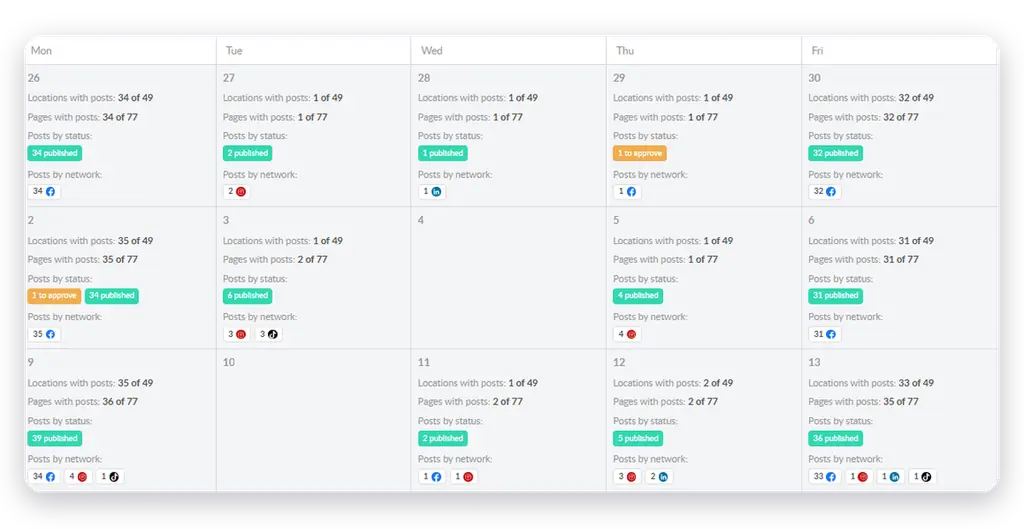
Publishing Overview is a new page in the Publishing menu. It shows one calendar for all the locations and pages you can access, by week or by month. For each day you see:
- which pages have content and which don’t
- the status of each post: published, scheduled, draft, waiting for approval, awaiting mobile posting, or failed
- the network, related Campaigns, and notes
Filter by brand, location, page, segment, network, or status. Want every post that’s still waiting for approval? One filter. You can open any post right there, without switching locations.
The monthly view is my favorite part. You see at a glance which days are full and which locations need more posts, so HQ can fill the gaps before the month starts.
We also redesigned the Calendar board view. It’s simpler now, with one feed per location or page. Publishing Overview is available to everyone.
2. Campaigns: easier rollouts across many locations
One campaign, 140 locations, four time zones. Before, someone had to schedule it four times or fix the times by hand. Now you set it once, and every location posts at 9 AM its own time.
Here’s what changed:
- Targeting. Pick locations by brand, geography, tags, or filters. “Select all” picks every location that matches.
- Time zones. Campaign tasks go out at the right local time for each location. You can set the time and time zone when you define campaign dates.
- Reusable assets. Add assets with availability periods, and see those timeframes in the asset grid.
- Local input. Where your workflow allows it, locations can review, approve, or customize campaign posts.
- No duplicates. The same campaign post won’t go to the same page twice.
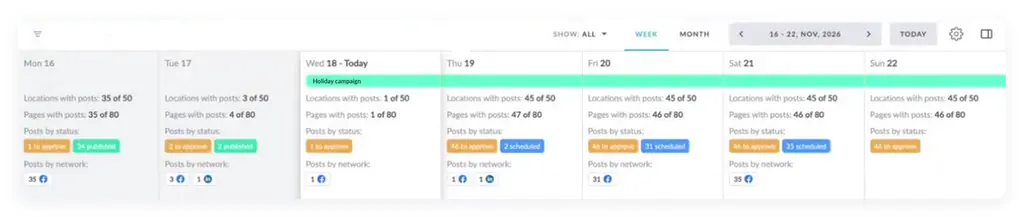
Campaigns also show up in Publishing Overview, so you can see the whole rollout in one calendar.
3. Organizations: one layer above all your brands
If you manage several brands, you know the pain of setting up the same people and rules again and again.
Organizations is a new layer above individual brands and locations. In one place, you manage:
- organization members and their access
- brands at the organization level
- SSO and access settings
- AI settings for the whole organization
Brand filters are now in the location and page selectors too, so it’s easier to work with one brand at a time.
4. Local Accuracy: website hours that update themselves
Wrong hours cost real visits. Picture a customer driving to your store on a holiday because your website still says “open.” Now picture the opposite: your team updates Thanksgiving hours in Listings on Monday morning, and by lunch every location page shows the same hours as Google.
Now your location pages can show hours straight from Listings. You copy a code snippet from Location settings (Website tab) and paste it on your site. It works with WordPress, Shopify, Wix, Squarespace, or any HTML site.
When you change hours in Listings, your website updates too, usually within about 20 minutes. That covers regular hours, holiday and special hours, and temporary closures. The snippet also adds structured data, so search engines can read your hours.
See a live example: hours.promorepublic.com
The feature is off by default. Ask your Customer Success Manager to turn it on.
More improvements across PromoRepublic
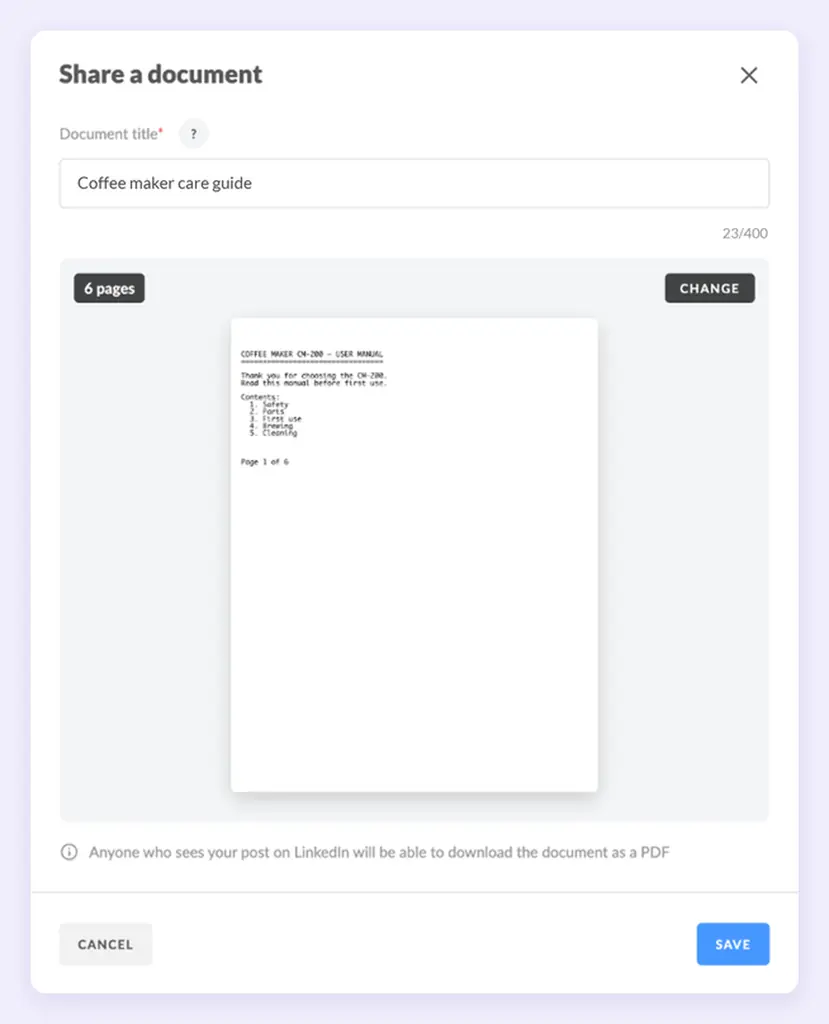
- LinkedIn document posts. Attach a PDF to a LinkedIn post in the Post Editor, and LinkedIn shows it as a swipeable document. Share a brochure, a guide, or a short deck from Company Pages and personal profiles, in regular posts, Campaign tasks, and My Ideas. Add the PDF from your device, from Asset Manager, or from a PDF template. Through Campaigns, one document reaches every location’s LinkedIn page from a single task. One PDF per post, up to 100 MB and 300 pages. Anyone who sees the post can download the PDF. You can’t change the document after publishing, password-protected PDFs aren’t accepted, and documents aren’t in the mobile app yet. Available to all customers on the web.
- Music for Reels and TikTok. Add music to Reels and TikTok posts in the Post Editor, from each platform’s licensed library for business accounts. Instagram Business: Reels with a single video. TikTok Business: videos, photos, and carousels, with trending tracks first. Preview the track, set the volume, and on TikTok pick where it starts. Works in regular and Campaign posts. Available tracks depend on the platform and the country.
- Instagram collaborators. Add up to 5 collaborator accounts to Business posts, Reels, and carousels, including Campaign posts. Collaborators accept the invite in Instagram. It doesn’t work for Stories, and you can’t change collaborators after publishing.
- LinkedIn Company Page analytics. For each Company Page post, see impressions, reach, and clicks in Page Statistics, the Social Performance dashboards, and Content CSV exports. Data covers posts from the last 62 days.
- Global search. Search in the header now finds locations, pages, team members, templates, campaigns, and app sections like Analytics, Inbox, and settings. You only see what your permissions allow.
- Annual reporting. Pick a 12-month period for annual reports and year-over-year comparisons.
- More reliable publishing. One disconnected account no longer blocks publishing to all the others. Google Business Profile posts that Google rejects no longer show as published.
- Clearer review replies. If a review reply fails to send, you now see an error, and the AI draft stays saved.
- Listings from each location. Open Listings straight from a PromoRepublic location, with no separate invitation.
- Facebook Stories from mobile. Publish Stories to Facebook Pages from the mobile app.
- Easier account connections. The @handle now shows next to the account name, so similar location pages are easier to tell apart.
- Bulk updates by permission. Managers can bulk update any locations they’re allowed to edit, not only the ones they own.
What’s next
We’ll post a roundup like this every month. Want to see any of these in your account? Already a customer? Ask your Customer Success Manager to turn on what you need. Not a customer yet? Book a demo and we’ll show you.